
Draft comparison page – not live, not indexed. This is a working copy for the priorities page redo. The real page is /align-academy/what-are-priorities/, unchanged for comparison. This page will be removed once the redo is finalized there.
A Priority is:
A change that takes the full quarter to accomplish. A priority connects your daily work to the bigger picture company goals and are the link between your quarterly strategic plans, and the work your team is doing to execute.
Your company may call them Goals, OKRs, Rocks or something else!
A Priority might be:
- A Company wide initiative
- A Personal outcome to strive towards
- A Cross-function high-level project with specific milestones
AI Accountability Coach
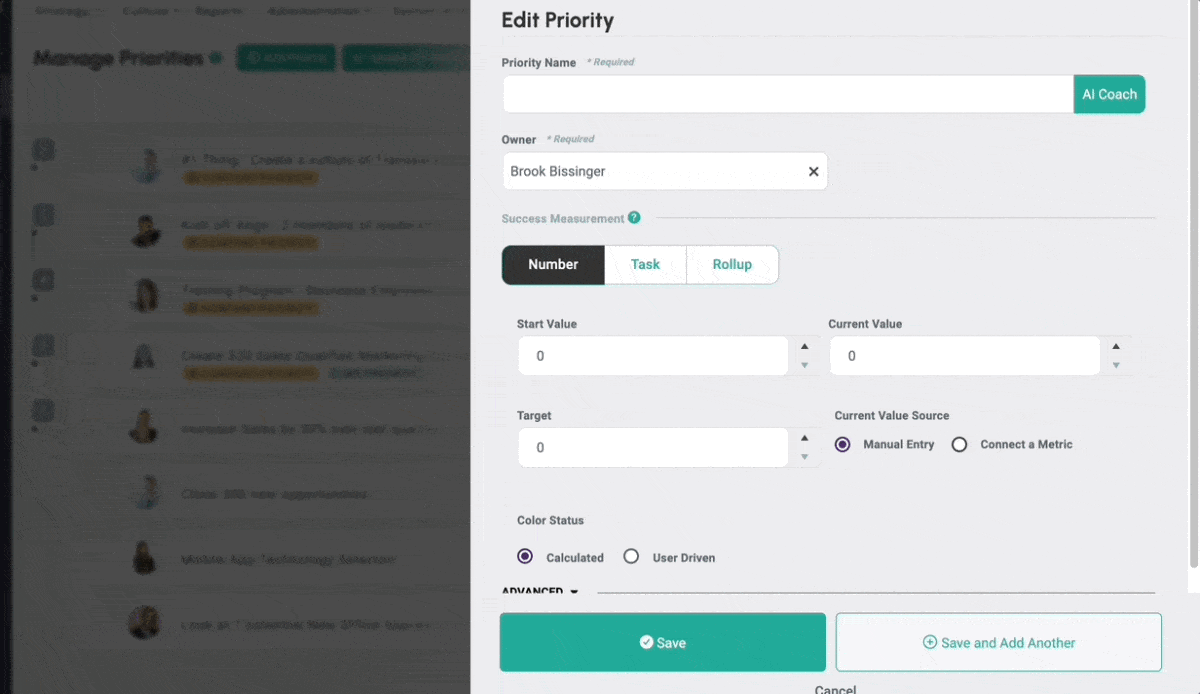
Stuck on setting the right priorities for the upcoming quarter? We’ve got your back. Designed to bolster your efforts in crafting SMART priorities, this tool is here to ensure your business goals are not just met, but exceeded. Start with the AI-generated draft and tweak it to perfection to align with your unique business landscape.
How do Metrics, Priorities, Critical Numbers, and KPI Cards fit together?
Each of these tools plays a specific role in turning your strategic plan into measurable progress. The key is understanding how they connect — and how each helps your team stay focused and aligned.
Priorities: The Strategy
Priorities are the big pushes — the key initiatives that will move the needle this quarter. They are your strategy in motion, helping your team focus on how to achieve your quarterly targets.
It’s easy to confuse a Priority with a Task or a Project, but they answer different questions. A Task is binary (done or not) with a due date — if a to-do takes more than two or three hours, it’s probably not a Task yet, break it down. A Project isn’t automatically a Priority either: if you finish it and nothing measurable changed, it was probably a project, not a Priority. If finishing it moved a real result, it was a Priority.
Great Priorities are clear, time-bound, and measurable throughout the quarter (not just at the end). You can track them using:
- A Metric that shows progress toward a key number
- A 14-week sprint that breaks the work into weekly milestones
- Or ideally, both — giving you visibility into both progress and pace
Critical Numbers: The Rallying Point
Critical Numbers are the 5 most important numbers for your business this quarter. These are the key signals of success — often leading indicators — and should drive behavior and focus across your team.
They’re elevated for a reason: when these move in the right direction, your company moves forward.
Metrics: The Connector
Metrics are the underlying data that power your dashboards, reports, and scorecards. A Metric might track sales, churn rate, client NPS, or any number that matters to your plan.
Metrics are reusable throughout the system. You can:
- Connect a Metric to a Priority or Critical Number
- Use it with an integration (like Salesforce or QuickBooks)
- Update it once and reflect it across multiple places in Align
Think of Metrics as the source of truth for your numbers.
KPI Cards: The Visualization
KPI Cards are visual dashboards that help you monitor what matters most. You can pull in Metrics, Priorities, or Critical Numbers — whatever is most important for your role or team — and track them in one view.
It’s your custom scoreboard. Whether you’re in leadership or managing a department, KPI Cards help you see at a glance whether you’re winning or need to adjust.
Why should I use Priorities?
Make Goals Actionable
SMART Goals
Making goals specific, measurable, actionable, realistic and timebound (SMART) sets a clear expectation of what needs to be accomplished to be successful.
Build Transparency
Clear Picture
The dashboards in Align give a clear picture around where progress stands allowing us to be more proactive when opportunities or red flags arise. Everyone can track throughout the quarter.
Connect to the Big Picture
Cascading shows Impact
Cascading priorities from the top down creates a direct link between your daily work and the overarching company goals. You can clearly see how your work affects the big picture metrics and have greater ownership in the company’s success.
Create Focus
Prioritize for Empowerment
Know how to focus your time and effort to make the most impact. Help your team prioritize the items that will accomplish the “right” things right now.
Get Started with Priorities
How to make the most of our your Priorities in 3 steps.
Step 1 – Build your Priorities – Try the AI Coach for a first draft
The first step is to get your ideas out of your head (or piece of paper) into the software where you can achieve them!
- Learn how to create Priorities! Watch the video (13min) below – it’s time stamped, so you can jump around!.
- Add in a Company Priority for the current time period
- Break down the Company Priority and create 1-3 individual priorities for yourself. We recommend each person should own no more than 1-3 priorities.
More Tutorials!
Check out the FAQs in the software. What is a User Driven Priority? How do I make my priority visible only to myself or my team?
Step 2 – Revise for impact
- Re-write your Priorities as if they will be done by the end of the period. As you do this, think about “if I achieve this outcome, will my contribution reflect what I expect?” Use the description section to answer Why, How, Success. “Why are we doing this in the company?” “How do I achieve this? Who is Involved and what needs to get done?” “Success – What metric lets you know you’ve succeeded?”!
- Revise your priorities – pair off with a colleague to “coach” through your Priorities – use these coaching questions to determine Strong v. Weak words. Make your Priorities SMART – check out the video below from Coach Herb Cogliano.
- Are you being realistic with your time? There are only so many hours in the day! Are you committing to a realistic amount of work on top of your current “in” the business activities? Use this calculator to see the number of hours, then estimate how much you feel is appropriate to devote to “on” the business activities. Depending on your role in the company, it could be 5% (entry level) or 75% (c-suite)!
Make Your Priorities Smart
Specific– Each priority should have enough detail that an outsider would understand WHY you need to achieve the goal, HOW you are going to achieve the goal, and WHAT you have done so far to achieve the goal. Align recommends breaking larger goals into smaller pieces, such that the “parent” priority explains your WHY, the “child” priorities explain your HOW, and the metrics and tasks explain your WHAT.
Measurable– Create priorities that have clear measurable outcomes using 3 different methods within Align. KPI driven priorities give you the ability to clearly define, and measure completion of your goals using either target counts, percentage of completion, confidence ratings or your own custom KPI units. Rollup Priorities allow for team collaboration on big objectives, ensuring that each team member has Alignment to the overall ‘parent’ priority. Task driven priorities give you the ability to have action items with specific due dates drive the completion of the priority. You can also accomplish this by creating a milestone based KPI driven priority.
Attainable– When creating your priority use the description box to fully lay out your action plan, so you and your team are clearly able to see the work that it is going to take to accomplish the goal.
Relevant– Sit down with your team and determine if this goal is truly something that needs to be achieved. Transparency is key here! Giving your team visibility into the priority allows everyone to determine the work being done is where your focus needs to be.
Timely– The most effective goals typically have a timetable for completion. Using Align to precisely map out, and keep track of the progress being made, will ensure your priorities never fall too far behind.
Step 3: Create Alignment & Execute
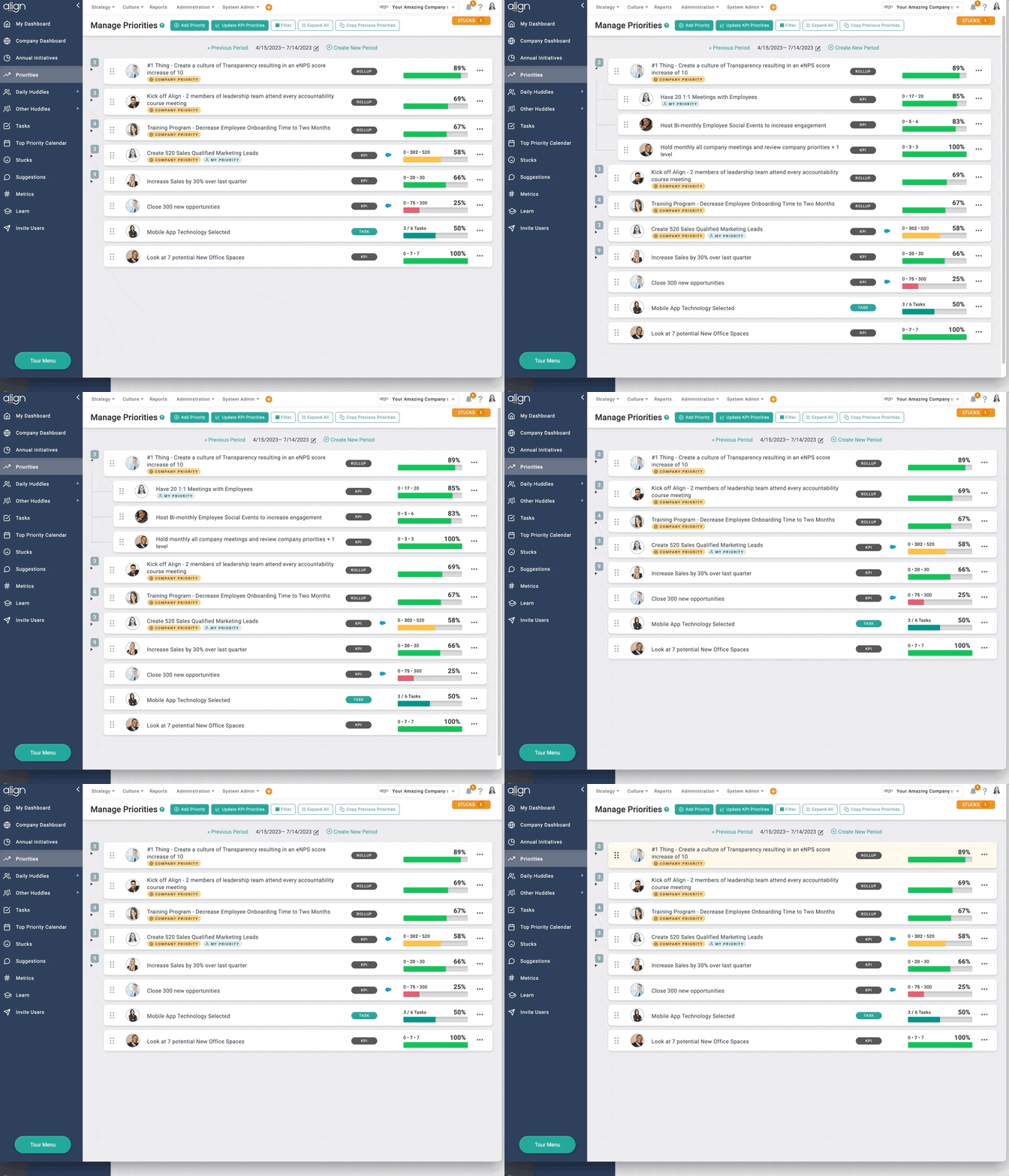
- Check the Cascade – Does your priority contribute to a Company Priority or Annual Initiative? If yes, make sure that priority is attached. If no, should you keep it? At least 1 of your priorities each period should contribute to a Company Priority or Annual Initiative.
- Align to a communication rhythm – do you have a 1:1 setup with your manager to review progress and ask for help?
- Find your #1 – Work with the whole company to identify the “#1” company priority – it’s the one thing that if you don’t get it done as a company this quarter, you will see clear consequences in your business. Label that priority – #1 – and create a huddle to talk specifically about the progress and all of the contributing priorities. We find every 2 weeks is a great rhythm that catches challenges in time, but does not over-burden the team!
Making Priorities Strong (PDF One-sheet) – Weak Words and Coaching Questions
Want additional help?
- If you’re struggling with WHAT to write, try a Targeted Coaching session focused on SMART/FAST priorities.
- Need help with HOW to put it in the software? Book an Advisor Led training for your team.
- Ask Align twice per week – ask our team of Advisors your questions! No registration necessary, just join the link.
Priority Best Practices
Some tips and tricks Writing, Executing and creating a Company-Wide Focus.
Writing Priorities
- Assign an Owner – Each priority will have an assigned owner who will be responsible for updating numbers and reporting on progress. This creates a culture of accountability that encourages individuals to seek help when needed and offer support when they’re ahead.
- Write each priority with the end of the period in mind. Ask yourself, “If I achieve this outcome, will it contribute to the Company Priority or Annual Initiative as expected?” This helps to ensure that your priorities are aligned with the company’s overall goals and objectives.
- Use Strong words to effectively communicate and inspire action. Be as specific as possible with your wording so everyone understands the end result you’re looking to achieve. We recommend you partner up with a teammate and use these coaching questions to discuss your priorities. Alternatively, you can reflect on them independently, but exploring priorities with a colleague can be more engaging and inspiring!
- Make it Measurable – Ensure that each priority is measurable, with clear criteria for 100% completion. This clarity will ensure that everyone involved understands precisely what is required to achieve each objective.
- Limit to 1-3 – Limit the number of priorities assigned to each person to 1-3, with at least one directly aligned with the company’s #1 priority. This will encourage individuals to focus on achieving significant progress without becoming overwhelmed. If there’s a number worth tracking that isn’t quite priority-level, put it in the Quarterly Actions section of your OPSP instead of adding another Priority.
- Align with Strategy – Establish alignment with the company’s strategy by asking each individual to align their priorities with the overall company priorities or annual initiatives. Each person should have at least one priority that is directly aligned with the company’s strategic goals to help everyone work towards a common objective and contribute to the company’s success.
BLOG BONUS: How do well written goals help with performance reviews?
Organize Priorities Around Outcomes, Not Departments
A Priority like “improve customer onboarding” or “reduce costs” usually isn’t one department’s job – it needs several teams working together, each owning a piece of it. That’s what Parent/Child Priorities are for: start with the company-level outcome, then build the supporting priorities underneath it, one per contributing team.
Before you create a new Priority, ask: is this a business outcome, or just a departmental initiative? If it’s an outcome, give it one clear owner at the top, then use Rollup Priorities to connect the teams contributing to it. Open the parent and check whether the child priorities actually add up to the result you expect – if one area is falling behind, you’ll see it well before it becomes an end-of-quarter surprise.
What the Status Colors Actually Mean
Align calculates a color for each Priority automatically, but you’re not stuck with it – if a priority is showing red and you feel good about where it’s really at, change the status color yourself. You own the number, not the other way around.
- Grayusually means a priority has been quietly forgotten – good intentions, no follow-through.
- Redmeans it’s time to face it head-on: was the goal unrealistic, or does it just need a focused action plan?
- Yellowmeans you’re close – find the one thing that gets you over the line.
- Greenmeans real progress (or the bar was set a little low). Whatever the color, the useful question is always the same: what’s the one action you’ll take this week to move it forward?
Executing on your Priorities
- Update progress regularly – Keep progress updates flowing regularly so everyone can see how things are going. We suggest doing it at least once a week, but if you’re really on top of things, daily updates are even better!
- Bring priorities to life – chat about them all the time! Make sure you’re discussing individual priorities in your manager 1:1s.
- Be Proactive – Address any stucks or opportunities related to your priorities during daily and weekly huddles.
- Identify your #1 Company Priority – Figure out the most important thing your team needs to accomplish this quarter – what’s the one thing that absolutely has to get done, no matter what? Once you’ve got it nailed down, add a big “#1” to the beginning of its name so everyone knows it’s the top priority.
- Create a Huddle for the #1 priority – Invite everyone who’s involved and depending on how deep the priority tree goes, you may create a few huddles related to the #1 priority. We suggest the #1 priority huddle meet every 2 weeks for an hour to chat about progress, ask for help, and come up with new ideas.
Create a Company-Wide Focus
- Reinforce Alignment:Ask each team member to align their personal priorities with the company’s overarching objectives. Assist your team in prioritizing tasks that will achieve the “right” goals right now. We recommend that each person align at least one of their individual priorities with a Company Priority or Annual Initiative.
- Lead by Example:When executives acknowledge their priorities falling behind in a daily or weekly meeting, it sets a positive example that it’s acceptable to experience setbacks, as long as actions are taken to address them promptly.
- Create Transparency:Don’t hide behind privacy settings. When you openly show how priorities cascade through the organization, it helps every employee see how their work contributes to the company’s success.
SMART Priority Breakdown
Specific– Each priority should have enough detail that an outsider would understand WHY you need to achieve the goal, HOW you are going to achieve the goal, and WHAT you have done so far to achieve the goal. Align recommends breaking larger goals into smaller pieces, such that the “parent” priority explains your WHY, the “child” priorities explain your HOW, and the metrics and tasks explain your WHAT.
Measurable– Create priorities that have clear measurable outcomes using 3 different methods within Align. Number driven priorities give you the ability to clearly define, and measure completion of your goals using either target counts, percentage of completion, confidence ratings or your own custom KPI units. Rollup Priorities allow for team collaboration on big objectives, ensuring that each team member has Alignment to the overall ‘parent’ priority. Task driven priorities give you the ability to have action items with specific due dates drive the completion of the priority. You can also accomplish this by creating a milestone based number driven priority.
Attainable– When creating your priority use the description box to fully lay out your action plan, so you and your team are clearly able to see the work that it is going to take to accomplish the goal.
Relevant– Sit down with your team and determine if this goal is truly something that needs to be achieved. Transparency is key here! Giving your team visibility into the priority allows everyone to determine the work being done is where your focus needs to be.
Timely– The most effective goals typically have a timetable for completion. Using Align to precisely map out, and keep track of the progress being made, will ensure your priorities never fall too far behind.
Priority Resources
Bring these resources to your team as your do the work to make and achieve your goals and priorities.
Educate your Team
- Measure what Matters (PDF Download – Updated Version coming soon!)
- Making Priorities Strong (PDF One-sheet) – Weak Words and Coaching Questions – This is a great resource provided by our friends at Petra Coach.
Playlists to learn the HOW
“How to” playlist (videos) for all things Priorities!
Enhance Your Priorities
- Priority “wizard” exercise (Fillable PDF)
- Making Priorities Strong (PDF One-sheet) – Weak Words and Coaching Questions
- Security – making your priority private
What are the 3 types of priorities?
Each priority type measures progress in its own way.
NUMBER-DRIVEN
Select a start and target value to measure your progress towards your goal. Example: Raise revenue from $120k to $160k this quarter.
ROLL-UP
The progress on roll-up priorities is determined by the statuses of its child priorities. Example: Set a roll-up priority to close 20 accounts by the end of the period and create child priorities for your 5 teammates to close 4 accounts each.
TASK-DRIVEN
If a priority has underlying to-dos that are too small to make sub-priorities, use a task-driven priority to measure progress. Task-Driven priorities are measured by the percentage of completed tasks. Example: Set a priority to launch your new sales site. Attach all of the tasks necessary to make this happen.
*Note: tasks can be attached to Number and Roll Up Priorities, but they only count towards the progress of Task Driven Priorities.